

PC specs requirements
AMD processors and above
how to install software..
1st Download is install this one..
DOWNLOAD vcredist_x86
vcredist_x86
2nd Download and open this Application
DOWNLOAD ppsspp
ppsspp


Requirements
Install the [Mod] App Market Apk Files» Breach and Clear v1.40d + Mod tutorial The Android Market apk file need to be installed manually, for that you don’t need to root your device, the installation process is easy and required only to download the Market APK file, then this downloaded file need to be transferred on your Android’s SD card, and after that you need to use a file manager for install the apk file on your device. In the forward lines, I will explain you a step by step guide. First Download [Mod] App Market Apk Files» Breach and Clear v1.40d + Mod and save it in your PC. - Then copy and paste (transfer) the Full Data [Mod] App Market Apk Files» Breach and Clear v1.40d + Mod downloaded file on your Android’s SD card device. - On your Smartphone open the file manager and find the APK file copied above. (A good file manager is ASTRO File Manager and you can download it from Google Play Store from here. - Now, enable “Unknown sources” from the menu under settings » Applications. - With the file manager application find the “apk” transferred file on the device’s SD card. - Now, tap on the Full Data to install it. - Congratulation, now you successfully installed the Market APK v 3.4.4 on your Android device.: Android OS 2.0.1 and Up
http://Androidonemicromax.blogspot.com/ - Overview about Breach and Clear v1.40d + Mod
Breach & Clear brings deep tactical strategy to mobile devices! Build your Special Operations team, plan and execute advanced missions, and own every angle.
Choose your real-world squad -- US Army Rangers, US Navy Seals, Canada’s JTF2, and more -- and take on a variety of foes with different skill-sets and abilities. Learn to approach, engage, and dominate your opponent through superior tactics and training, while leveling your characters in one of the deepest progression systems created for mobile devices.
FULL CUSTOMIZATION
Build your arsenal with thousands of gun combinations, and specialize each soldier with a combination of perks, tactics, camo, armor, and inventory all tailored by you. Tune your load-out with consumables like UAV Drones and Breaching Charges that can change the course of battle!
OWN EVERY ANGLE
Each soldier matters, every decision counts. Plan your mission step-by-step: split up your team and assault the map from multiple entrance points, set routes and fields of fire, use cover and outflank your foe.
REALISTIC, TACTICAL COMBAT
Developed with help from members of the Special Operations Forces community, Breach & Clear features actual close-quarters combat tactics and a variety of door-breaching techniques. Soldiers equip real-world weapons and gear. Firefights take place in real time.
The world of Breach & Clear is constantly evolving, with new maps, gear, game modes, and squads coming soon.
82/100 - "Rainbow Six meets XCOM." - GamesMaster Magazine
"A thinking mans shooter." - Android Police
Bronze Award - "...when a smartly conceived plan comes together Breach & Clear is every bit as satisfying as Frozen Synapse or XCOM: Enemy Unknown.." - Pocket Gamer
"I can’t believe something as impressive as Breach & Clear almost managed to sneak by me. It’s a fantastic combination of turn-based strategy and team-based tactical shooter that absolutely should not be missed." - 148Apps
Whats New
-Miscellaneous optimizations
how to install
Install Apk
copy the "com.gun.bnc" Folder to SD Card/android/obb
launch the Game
More Info Breach and Clear v1.40d + Mod Androidonemicromax:
https://play.google.com/store/apps/d...id=com.gun.bnc
Download Instructions:: by : chathu_ac
Download Url
Download Url
Download Url
Download Url
Download Url
Mod Money/Unlocked
Download Url
Download Url
Download Url
SDCard/Android/obb:
Download Url
Download Url
Download Url
Download Url
Download Url
 |
| Get instant scores and match schedules when you search [cricket] on Google |


 |
| Look fierce: paint your face digitally with Google |


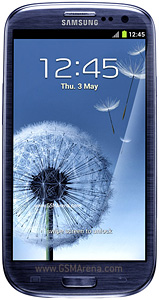 Phones4U have both the Pebble Blue and Marble White versions available for pre-order and you get a choice between Vodafone, Orange and O2 for an operator. Vodafone and Orange offer the Galaxy S III for free with a 2-year contract costing at least £38.50/month (for 800 minutes, 3000 texts) and £36/month respectively (for 600 minutes, 3000 texts).


When you get a new iPhone--especially if its your first iPhone--there are literally hundreds (maybe even thousands) of things to learn how to do. But you need to start somewhere, and that somewhere ought to be the basics. Read on for suggestions and instructions on the first 9 things you should do when you get a new iPhone (and a 10th if the iPhone isnt for you, but is for your child). Though these tips only scratch the surface of what you can do with an iPhone, theyll start you on your path to becoming an iPhone pro.

If your new iPhone is your first iPhone, iPad, or iPod, follow the instructions in the article linked to above. If youre upgrading from an earlier device, read on.
This difference exists because iPhones running iOS 5 and higher dont have to be connected to a computer to be set up; they can be set up and used without ever being synced to iTunes. If youre upgrading, though, youll probably want to connect to follow the steps below and connect to iTunes to restore your old data onto your new phone.
If you use the iOS 5 activation, when youre done, skip to item 7 below.
 image copyright Apple Inc.
When it comes to the iPhone, iTunes is much more than just the program that stores and plays your music. Its also the tool that lets you add and remove music, video, photos, apps, and more from your iPhone. Its also where a number of settings related to what goes on your iPhone live. Needless to say, its pretty crucial to using your iPhone.
If your computer didnt come with iTunes pre-installed, you can get it as a free download from Apple. Get instructions on downloading and installing iTunes:

If you want to use the iTunes Store or the App Store--and you must, right? Why would you get an iPhone if you didnt want to take advantage of its hundreds of thousands of amazing apps?--you need an iTunes account. These free accounts not only let you buy music, movies, apps, and more at iTunes, theyre also used as part of iCloud, Find My iPhone, FaceTime, and many other awesome technologies on the iPhone.
 image copyright Apple Inc.
Once youve got iTunes and your account in place, its time to plug in your iPhone and start using it! From learning how to add content to your iPhone to how to arrange apps into screens and folders on your iPhones home screen, youll learn how to do it here.
 image copyright Apple Inc.
Using your iPhone gets much easier when you have iCloud--especially if youve got more than one computer or mobile device that has your music or apps on it. ICloud collects a lot of features together into a single tool, including the ability to back up your data to Apples servers and re-install it over the Internet with one click. ICloud also allows you to redownload anything youve bought at the iTunes Store, so even if you lose or delete them, your purchases are never truly gone. And its free!
 image copyright Apple Inc.
This is crucial. Find My iPhone is a feature of iCloud that lets you use theiPhones built-in GPS to pinpoint its location on a map. Youre going to be glad you have this if your iPhone ever goes lost or gets stolen. In that case, youll be able to locate it down to the part of the street its on, which can be important information to give to the police if youre trying to recover a stolen phone. But in order to use Find My iPhone when your phone goes missing, you first have to set it up. Do that now and you wont be sorry later.
 image copyright Apple Inc.
While the apps you get at the App Store are the ones that get the most hype, the iPhone comes with a pretty great selection of built-in apps, too. Before you dive too far into the App Store, learn how to use the built-in apps for web browsing, email, photos, music, calling, and more.
 image copyright Apple Inc.
Once youve spent a little time with the built-in apps, your next stop is the App Store, where you can get all kinds of new programs. Whether youre looking for games or an app to watch Netflix on your iPhone, ideas on what to make for dinner or apps to help you improve your workouts, youll find them at the App Store--and usually just for a few dollars.


