The APN of iPhone 6 Plus does not like magnets lenses

  This is a constraint that it is better to have in mind in the midst of holiday shopping, and therefore potentially new accessories to add to his precious iPhone 6 Plus. If the APN of the iPhone 6 Plus is considered one of the best, it is also a powerful optical stabilization system ... therefore we do not place near magnetic object. For it seems that the magnetic field of the magnets disrupts the normal functioning of the stabilizer, resulting in strange effects and inevitably quite far from the desired result. (see video)


  It is not a question in itself of a particular defect; include this constraint and this sensitivity in other products as Apple and it is generally not advisable to place the magnets too close to electronic equipment. In the case of the iPhone 6 Plus unfortunately, this means that every third objective systems running on a magnet for "take" on the smartphone should be avoided.

The APN of iPhone 6 Plus does not like magnets lenses

  In one of its supports pages, Apple would not recommend any type of accessory with a magnetic piece could end up close to the location of the stabilizer (just at the lens of the camera). This warning applies to both the targets individual bags pouches with magnetic clasps.

Read More..

Sunday 05 January 2015 Mission Bay Auckland New Zealand

Ladt Dayog the long holiday! Very crowded in Mission Bay, Auckland, New Zealand 


--
Regards,

David Lim
(021) 264-0000

Our new branch:
Dr Mobiles Limited - Wellington
148, Willis Street,Te Aro, Wellington 6011, Tel: (04) 550-6399 andMobile: (021) 265-2000.  Email: wgtn@drmobiles.co.nz,   Facebook

Read More..

UMPC is saving our Planet

for lovers of UMPC is that the little Ultra-Mobile devices are actually considered one of the smallest contributors to Green House Gases, and Carbon Dioxide gain.
As you all know Jon Dee is the founder of Planet Ark and he is also a Tablet PC user. His gola in life to to create a sustainable and renewable planet and he sees Tablet as playing a significant role in that; even the paperless office remains at the forefront of his Tablet PC productivity practices.

I want to take a moment to thank Jon and all of you that take the Planet seriously. I have been enthusiastic and interested but remain considerably ignorant. I pledge to make it my goal to gain any information that may be appropriate and disseminate it in the best way I know how, i.e. Speech, Vlog and Blog. If you guys want to be part of the solution then please point me to links and tips and tricks relating to PC/UMPC usage and caring for the environment.

As an FYI, and I know this won’t come please several of you, but Jon and I cannot shoot a video tomorrow due to other constraints once again. I will be “probably” be in Seattle next week on the MVP Summit which means the video may be delayed even further. I do promise to get back on the Camera however and it may even be tomorrow.

Read More..

When Poogie spoke at Microsofts Hallowed Turf

The following is a re-enactment of the day Hugo ‘poogie’ Ortega first preached Tablet PC behind the hallowed doors of Microsoft Head Quarters in Sydney, Australia.

Tuesday 17th January, 2006

Finally Id done it - got MCE running on my Touch Tablet - so I had to call someone and let them know. Neil, yeh Neil! So Im in the car going to a meeting and there I am telling my mate, and Microsoft MVP, Author Dr. Neil Roodyn, about how cool it was running the Tablet via remote control, and how pleasing it was to add the kinaesthetic quality of the Touch Tablet with it too. Neil proclaims, "I know some geeks that will love to see that, come to the .NET User Group, at Microsoft".

Wednesday 18th January, 2006

Driving into the industrial estate that houses many-a-muscle in the IT space was a truly fun experience, Oh, theres Fuji! “Take the next left”, says Neil... “There’s the driveway on your next right...turn now”.

Holy smokes, Im here! There it was, Microsoft Head Office Australia. As we pull into the driveway Dr. Neil orders me to take one of the Visitor spots, to which I happily oblige. I grab my Tablets and walk the Granite coble stones to the front door.
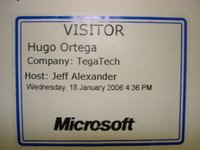
I cant distinctly remember wether we pushed the doors open, or if they slid open, but there I was! As I stood in the Marble infested lobby, ridden with huge panes of glass, I glance to my right. There’s the Microsoft CafĂ© in which dwell 10, maybe 20, Uber.Geeks like me, hacking away at there cheesecakes and taking mouthfuls of laptop while they conjure a hive of activity and passion. We walk left and past a new set of branded glass doors into the reception room. "Hi Neil", she says. [Im nine years old and in Disneyland again]. Dr. Neil punches in our details and thermally impregnates our names on some Visitor Passes.

We wait!

A brisk walk, in-step with our host, and were lead into our room for the evening; not before having past through two more sets of branded doors. We grab a desk, we plug into the cat-5 network, we extend our desktops onto the huge Projector screen, and were ready.

Usually held on the 3rd Wednesday of every month, the Sydney .NET Users Group covers Microsoft Winforms, Webforms, VB .NET, C#, Access, SQL Server, XML, Exchange Server and SharePoint Portal Server, new products, legal issues of software development and tips and tricks. The meeting starts with Industry news, new products and developments then moves on to the feature topic. Afterwards a problem solving session is held where development problems are heard and suggestions put forward by the attendees (youre sure to get an answer to your questions). For more info visit: http://www.ssw.com.au.

Our emcee for the evening, Microsoft MVP and Chief Architect at SSW, Adam Cogan opens the evening…“Theres Subway in the foyer, go eat and well get stuck into it". OK! Ill do it! Two subways ‘with the lot’ and Im back in the room.

They talk, he talks, they talk some more, he talks heaps more, the atmosphere is candid and I get the impression that Im sitting amongst friends. He talks some more, they all .NET all over each other and then its my turn.

"Blah, Blah, Tablet, Me, You...hahaha, Tablet, Tablet, Me, Me, You, You...hahaha!" I cant believe it, my ten minutes are up. "Let’s all thank Hugo", bellows Cogan. Clap, Clap, Clap and I take a seat.

Dr. Neil then takes the stage and begins to preach Virtual Earth to our congregation. He awes the audience with wit, charisma and occasionally lovingly chastises the group to enforce some of his principles. Clap, Clap, Clap and Cogan holds courts once more.

Neil and I take an exit while the group .NET for several hours still. We exit the auditorium to find Uber.Geek, Jeff Alexander, IT Pro Evangelist - Microsoft, and a small clan talkn Tablet. Jeff is a fellow Preacher and a one-eyed monster when it comes to Microsoft MCE. He welcomes the Tablet talk [as you might the Prodigal Son, had you of been the Dad]. We talk Turkey and share stories over roasted marshmallows (the marshmallow bit isn’t true).

Clap, Clap, Clap..."well see you next month", trumpets Cogan. I head out the labyrinth that is my new Friend and as I hit the cobbled granite once more I try and conceal the longing that has already drowned my soul. Will she call? Will she remember me tomorrow? I left her my number, and a good impression... Microsoft, oh Microsoft, I hope I did enough to win your affection.

The .NET User group, a warm bunch of scripting aficionados, had 10 minutes of my take on what is Tablet PC. From the 3 Tablet PC owners in that room of 60+ I could gather but one thing - my work has only just begun!


  • Have you ever been invited to Speak at Microsft offices?
  • Are you part of a User Group youd like us to hear about?
Read More..

Android Code

Setting Logo Back

Please Click Follow Number code

Logo setting : Note 2, S3, S4
*#11111#*
*#0066#
*#*#11111#*#*

imei re-write : Note 2, S3, S4
*#*#101113#*#*
*#*#83646633#*#*
*#*#9826835#*#*
*#*#82043036#*#*

Note 2 (mushroom) - 
*#*#82043036#*#*

Read More..

Redmond lends a hand

When one of my readers, Aviruth, reported that the ASUS R2H Ultra Mobile PC shipped without the Microsoft Snipping Tool it was enough to raise some concern. Not only is the Snipping Tool a powerful Tablet enhancement but it also makes disseminating information a lot easier when in a keyboardless environment, i.e. UMPC and Slates.

The Snipping Tool was released as part of the Microsoft Experience Pack for Tablet PC in 2005, and later as art of the combined Education Pack/Experience Pack named The Enhancement Pack. Dustin Hubbard, group manager on the Tablet PC Mobile Platform team did a great job of demo-ing the User Interface (UI) on Channel Nine – this video.

So when I heard the Snipping Tool was not part of the R2H internals I left a comment recommending that Aviruth download the Experience Pack and install the Tool from there…surprisingly the results came back negative, i.e. the Tool would not install. So after a few emails to my friends in Redmond the results have come back from their investigations. Although there is nothing too surprising the results are defiantly worth posting.

So Aviruth, try out these suggestions and get back to all of us on your results.

The Email:
Read More..

HTC One mini configuration details Beautiful glitter but overpriced 600

 HTC One mini configuration details: Beautiful glitter but overpriced $ 600
 HTC One mini configuration details: Beautiful glitter but overpriced $ 600
Maybe mini Smartphone is becoming a more mainstream mobile manufacturers apply. After the mini Galaxy S3, S4 Galaxy mini or iPad mini so now we have one more new recruits come from Taiwanese phone firm HTC. Recently, after much speculation, as well as previous leaks, HTC has officially launched a shortened
Read more »
Read More..

Nokia Finally Agrees to Sell Vertu to EQT VI


The rumors of Nokia plans to sell its subsidiaries engaged in a luxury phone, Vertu, was widely circulated. And, finally come true issue, which Nokia announced officially that EQT VI, a private equity firm in Northern Europeacquiring Vertu.

Nokia releases Vertu because they do not support the plan going forward with Windows Phone. Later EQT VI will acquire 90% stake in Vertu, and the remaining 10% still remains in the hands Nokia. The share sale transaction will be done in the second half of this year, which seems a matter of time.

As is known, Vertu was established in 1998, where its headquarters are in England. Vertu has at least 1,000 employees worldwide. During this time targeting the upper segment of Vertu, by producing luxury phones. No doubt, the best technology and software owned harfdware Nokia are in each product, which makes mobile-phone-quality premium.

There has been no clear strategy with the new owner will Vertu EQT VI. Whether the latter will still run with the Nokia-style platform in each product? Or even going to release a fancy smartphone like the Android-based platform, given the decision will be in the hands of new owners. We wait for its development.
Read More..

4 Advantages of apple iPhone 5s

Who is not familiar with the Apple iPhone, a smartphone that is elegant and good in terms of appearance and in terms of technology. Technology is always a great smartphone developed by Apple.and this time we will explain about some of the advantages of the Apple iPhone 5S. there are 4 or less conspicuous excess  and striking advantages of previous versions in terms of the camera and also Processor. 4 advantages are as follows :
  1. 64-bit processors. iPhone 5S be called the worlds first smartphone that comes in the form of a 64 bit processor chip Apple A7. Apple claims that this processor has a data processing and graphics performance two times faster than  its predecessor, the Apple A6 on iPhone 5.Apple helped prepare the following operating system iOS 7 applications that can utilize 64-bit architecture of the iPhone 5S. The phone is also capable of running the software titles are 32-bit designed for its predecessor.
  2. Companion processor to monitor the motion sensor. In addition to the main A7 processor, Apple also immerse processor companion named M7. His job is to deal specifically with input from various sensors in the iPhone,  includes accelerometer, gyroscope, and this companion Compas.Processor reduce the processing load on the main processor and open the possibility of utilization by navigation applications and health, for example: Nike+ Move.
  3. Camera iSight new. The unit has a camera on the iPhone 5S sensor size is 15 percent larger than its predecessor. The larger sensor also increases the size of each photodiode (pixel) which in turn increases the quality of the resulting image. This concept is similar to the technology Ultrapixel from HTC. However, Apple does not cut or increase the resolution of the camera, but keep the numbers at 8 megapixels.Completeness is not less interesting is the flash light with two colors is able to automatically adjust the white balance of flash output so in tune with the lingkungan.Selain light conditions, there is also the ability to record slow-motion video with a frame rate of 120 FPS at 1280 x 720.
  4. Fingerprint scanner. This one feature related to security. iPhone 5S able to take advantage of the users fingerprint as a replacement for login password, included in the lockscreen unlock iPhone.services such as Apples iTunes also supports user authentication through fingerprint scanning fingerprint jari.Sensor on the iPhone 5S integrated on the button Home in the face.Now the button is made of scratch-resistant sapphire and is able to scan the users fingerprint from various directions.

Read More..